
When Do We Stop AI? Analyzing Rejection Rates
When you hand off tasks to AI, you ask it if it's safe to proceed with something that looks risky. Most people think this question acts as a safety net, but I never actually counted what it was screening. I pulled up the 102,171 tool calls recorded in the activity log and separated the rejections. There were 306 rejections, which was only 0.3%. That means it lets almost everything through. However, those 306 rejected calls were heavily skewed toward one area. All 306 were local shell commands, and 243 of those were file deletion commands. Commands to write or modify files (12,650) and commands sent to remote servers (7,542) weren't blocked even once. Furthermore, of the 243 deleted files that were blocked, 170 were files that could actually be recreated.
Only One Type of Action Gets Blocked
I broke down the 71,098 local shell commands into deletion commands and all other commands.
| Command Category | Total Attempts | Rejected | Rejection Rate |
|---|---|---|---|
| Deletion Commands | 2,670 | 243 | 9.1% |
| All Other Commands | 68,428 | 63 | 0.09% |
That's a difference of about a hundred to one. Even when using the same tools, the AI's response changes drastically depending on what the command is trying to do. Out of the 2,670 deletion commands, 2,160 included forceful or recursive options, and all 243 rejections were from commands with these options. Simple deletions without any special options were never blocked.
But if you look at it the other way around, a different picture emerges. Of the 2,160 deletions that included options, 1,917—that's 88.7%—were executed as is. This tells us that the benchmark isn't simply "block any deletion command." It let nine out of ten slip through, and only stopped at one in ten. The real question of this post is: how was that one in ten chosen?
The Untouched Areas Are More Interesting
| Type of Operation | Calls | Rejections |
|---|---|---|
| Local Shell Commands | 71,098 | 306 |
| File Write/Modify | 12,650 | 0 |
| Remote Server Commands | 7,542 | 0 |
We saw 12,650 instances where an entire file was replaced with new content, and not a single one was flagged for review. Overwriting is very similar to deleting; in both cases, the original content is gone, and unlike deletion, there's no trace left behind. The system asks for permission when you delete a file, but it doesn't ask when you completely replace the contents of a file.
Remote Servers Never Trigger a Block
What stands out is the remote activity. Out of 7,542 commands sent to the server via SSH, zero were rejected. If you delete something locally, you might be able to recover it using the trash or version control, but that's not possible with a remote server. The real danger lies in the remote actions, yet the prompts are coming from local operations.
There are other commands that are just as hard to undo as deletion. These include pushing data to a remote repository, completely reverting a set of changes, or wiping untracked files. These types of commands were run 179 times, and again, the rejection count was zero.
When Was Something Blocked?
This is where the story changes. We broke down the 2,670 deletion commands to see what was being targeted for removal.
| Target of Deletion | Rejections | Passes | Rejection Rate |
|---|---|---|---|
| Dependency Folders | 6 | 11 | 35.3% |
| Backup Folders | 16 | 32 | 33.3% |
| Temporary/Cache Files | 68 | 429 | 13.7% |
| Documents/Config Files | 15 | 175 | 7.9% |
| Build Artifact Output | 82 | 1,577 | 4.9% |
| Source Files | 2 | 46 | 4.2% |
| Other | 54 | 157 | 25.6% |
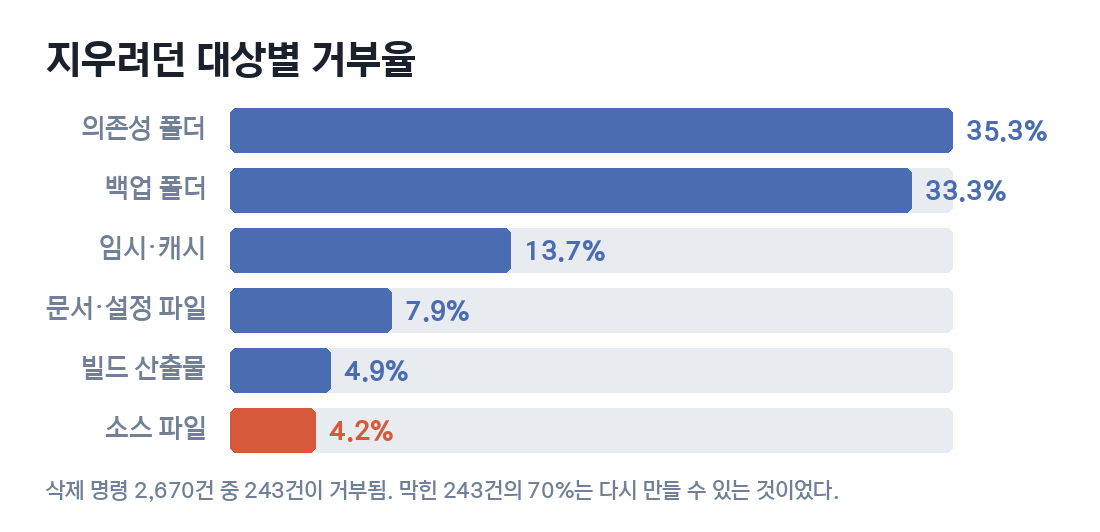
Out of 243 blocked actions, 170—70.0%—involved things like build artifacts, caches, or dependency folders; essentially, things that you can just rebuild with a single command. These safety measures are in place to protect what you can't get back, but most of what was flagged was actually disposable.
The things you can't recover were the least likely to be blocked
If you read the chart from the bottom up, the pattern becomes clearer. For the 48 attempts to delete source files, only 2 were blocked, which is just 4.2%. That's the lowest percentage among all the categories. It’s almost the same as build artifacts at 4.9%, but the difference is that you can always recreate build artifacts, whereas source files you can't.
On the flip side, the highest refusal rates were seen with dependency folders at 35.3% and backup folders at 33.3%. Dependency folders can be restored with one command, and backup folders are, well, backups by definition. Both are things you don't lose much by losing, yet they were blocked the most often.
I think the reason comes down to size and naming conventions. Dependency folders look like they contain a massive amount of data when you try to delete the whole thing, and the word "backup" itself acts as a stop sign. Deleting a source file, on the other hand, is just a short command to delete one file, so it doesn't look as threatening. It seems the decision was based on the *impression* of the command rather than the *weight* of the result.
The Danger Lurks in the Middle of the Sentence
If you count the first word of a rejected command, you'll see the same story repeated. The most common word wasn't rm; it was cd. Out of 2,670 deletion commands, 2,338—a whopping 87.6%—didn't start with a delete command. It looks like people are chaining together three actions in one line: moving something to a folder, deleting it, and then checking the results.
This means the decision isn't based on what the command *does*, but on what it *looks like*. If the deletion keyword is in a prominent spot, people pause. If it's buried in a long string of text, it just gets overlooked. In fact, the median length of rejected commands is 177 characters, while approved commands average 258 characters—the rejected ones are shorter. It's more accurate to say we blocked them because they were hard to read, not because they were inherently dangerous.
We've already seen that longer commands have a higher failure rate. But length doesn't just increase the failure rate; it also neuters human review. Long commands are more likely to have errors, and at the same time, they are less likely to be caught. When you combine these two metrics, you get the riskiest combination: a command that is long, bundles multiple tasks, and has the deletion part smack in the middle.
What Happens After a Command Gets Blocked?
We looked at what happened immediately after 306 commands were rejected.
| Action Taken After Rejection | Count | Percentage |
|---|---|---|
| Moved on to another task | 267 | 87.3% |
| Tried the deletion again | 37 | 12.1% |
| It was the last action in that session | 2 | 0.7% |
Nine out of ten times, once a command gets blocked, people drop that line of thought and move on to something else. Looking closer at the 37 commands that were retried, many people either narrowed the target from a folder to a single file, reduced the recursion level by one, or decided to compare the two files before deleting them. Some simply re-ran the exact same command. In fact, only two instances resulted in the work being completely stopped by the rejection. Contrary to the impression that the approval process halts work, it mostly just redirects the workflow.
Rejections Tend to Cluster in Certain Sessions
Out of 187 sessions where the tool was used, 62 sessions—33.2%—had at least one rejection. The remaining 125 sessions had absolutely nothing blocked.
| Number of Rejections Per Session | Number of Sessions |
|---|---|
| 1 | 22 |
| 2 | 9 |
| 3 | 4 |
| 4 | 9 |
| 5 or more | 18 |
The median was 3, but the session with the most rejections had 38. When I dug into that session, I found the process was repeatedly deleting and recreating the build folder. This suggests there are certain types of issues that keep popping up. It's like the idea that breaking down tasks into smaller pieces reduces sticking points, but conversely, this log alone can't tell us if a person can maintain the same level of attention when the same question comes up thirty or more times.
What These Numbers Don't Tell You
Here’s how I measured things. I paired tool calls with their results from the operation logs and counted every instance where the result contained a rejection message. For the command, I isolated words related to deletion within the command text and only counted those that appeared at a position where a command would start according to shell syntax—this was to exclude cases where the character was part of a filename. Since the target to be deleted was categorized by words in the path, if a single command deleted multiple targets, it was counted under the first one it hit. I cross-checked the totals to ensure the counts for each tool, category, target, and session all added up correctly during a single calculation.
I have four limitations to this analysis. First, I can't judge if the rejections were correct. This log can't tell me if the 243 actions that were blocked were truly dangerous, or if the 2,427 actions that passed were safe. What this article tracks is the trend of the decision, not the accuracy of the judgment itself.
Second, in 63 instances that weren't deletions but were rejected, I found commands that were just reading files or comparing changes. These seem to be cases where the process was halted to change the direction of the work, not because it was inherently risky. A rejection doesn't automatically mean a dangerous action.
Third, commands that were pre-approved never trigger a prompt, so they aren't recorded here. The actual questions that came up in front of a human are fewer than what this tally shows.
Fourth, the measurement includes sessions that accumulated while the measurement was being taken, so the grand total shifts slightly depending on the point in time. That's why I pulled all the figures together in one single calculation.
Even so, there are three clear takeaways from the sample. Deletion and other rejection rates were 99 times higher, and 7,542 remote commands and 12,650 file modifications were never blocked. Furthermore, 70% of the blocked deletions were things that could have been recreated. If you trust the approval process as a safety net, it might actually be flagging words that just *look* risky, rather than truly dangerous operations.