
How AI Errors Change with Prompt Length
When you ask an AI to run terminal commands, sometimes it gets it right the first time, and other times it loops back to the same spot over and over. I used to just have a "feeling" about how often each scenario happened, but since I kept records, I decided to count. I pulled all the shell commands the AI executed from 205 work sessions between August 1st and September 23rd and checked the results for each one. Out of those, 1,971 instances had error messages, which was 2.7%. I figured that meant out of 100 tries, 97 would go through successfully, which felt lower than I expected. However, this error rate wasn't consistent across the board. Short commands, under 80 characters, had a 0.9% error rate, but long commands exceeding 1,500 characters had a 6.3% error rate. The same AI, running commands on the same server on the same day, saw its error rate jump seven times depending on the command length.
What I Measured First
The session logs pair every command the AI sends with its resulting output. I pulled all of these pairs and checked the output side for any error messages. I focused on two types of commands: those sent to the local shell and those sent as remote commands via SSH. I excluded any other tasks like file reading or writing.
| Item | Count | Percentage |
|---|---|---|
| Total Command Pairs | 72,912 | 100% |
| Not Executed (Rejected by Human Approval) | 294 | 0.4% |
| Actually Executed | 72,618 | 99.6% |
| With Error Messages | 1,971 | 2.7% |
| Exit Code Not Zero, But Output Normal | 1,164 | 1.6% |
The key to this measurement lies in the last two rows. Just because an exit code isn't zero doesn't automatically mean it's a failure. Sometimes, a command that returns '1' is just telling you that nothing was found when you asked for something that doesn't exist—that's not an error in the command itself. If I included these 1,164 instances in the failure count, the failure rate would jump to 4.3%, inflating the number by 1.6 times. So, I only counted as a failure if there was an actual error message in the output.
The Longer Your Prompt, The More Likely It Is to Fail
When I broke down the data by the character count of the prompts, a clear trend emerged.
| Prompt Length | Total Executions | Failures | Failure Rate |
|---|---|---|---|
| 80 characters or less | 8,617 | 78 | 0.9% |
| 81–200 characters | 19,911 | 247 | 1.2% |
| 201–500 characters | 21,685 | 569 | 2.6% |
| 501–1,500 characters | 14,626 | 585 | 4.0% |
| Over 1,500 characters | 7,779 | 492 | 6.3% |
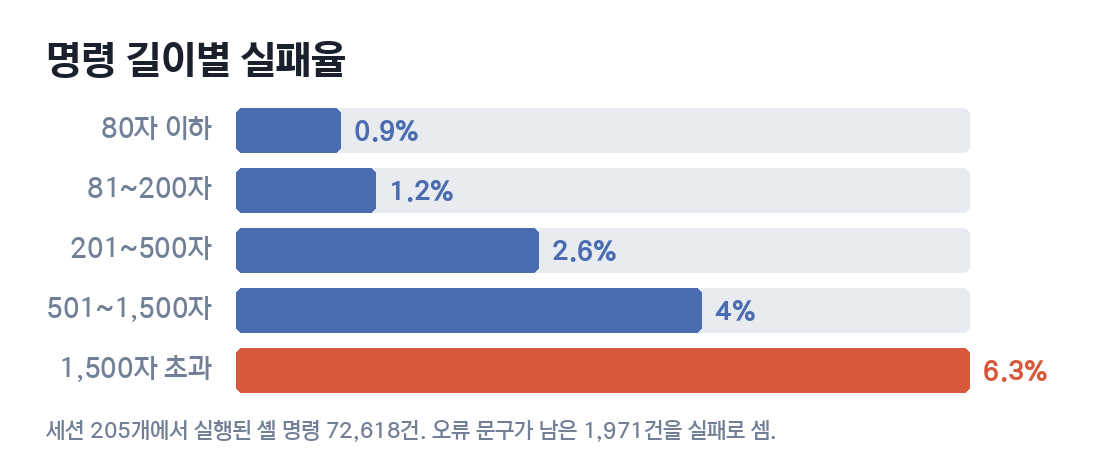
The failure rate just kept climbing as the length increased, and it never dipped. What really jumped out was that prompts over 1,500 characters—which make up only 10.7% of all prompts—account for 25.0% of all failures. On the flip side, short prompts under 200 characters make up 39.3% of the total but only cause 16.5% of the failures. For context, the median prompt length was 263 characters, while the average was 635 characters. The average being more than double the median is due to a few extremely long prompts, with the longest one being 28,514 characters.
What Causes the Length?
Since the length itself might not be the root cause, I broke the data down further by looking at two other factors: how many times you used the double ampersand symbol (&&) in your prompt, and whether you were passing entire multi-line strings.
| Number of Continuations | Total Runs | Failures | Failure Rate |
|---|---|---|---|
| 0 | 36,397 | 644 | 1.8% |
| 1 | 22,405 | 707 | 3.2% |
| 2 | 6,443 | 259 | 4.0% |
| 3 | 3,372 | 136 | 4.0% |
| 4 or more | 4,001 | 225 | 5.6% |
Even adding just one continuation jumps your failure rate from 1.8% to 3.2%. Once you start chaining them, you create two potential failure points, and if the beginning is wrong, the rest can't even start, meaning a single failure can cause a lot of things to fall apart. However, since the rates for 2 and 3 continuations are both 4.0%, it doesn't seem like it increases indefinitely.
The difference was even more pronounced with multi-line strings. The failure rate for the 19,246 commands we used with this method was 5.1%, compared to only 1.8% for the 53,372 commands that didn't use it—that's a 2.8x difference. When things like quotes, line breaks, and indentation have to pass through the shell as one solid block, even a tiny mistake in one character can cause the whole thing to be rejected. In fact, 23.1% of the failures were due to syntax errors. This pattern of length causing issues was similar when we re-ran code blocks written by AI on Damyo.net; back then, it was about things overflowing the screen, and now it's about executions failing, but the root cause in both cases is that the entire chunk is too large.
What Kinds of Errors Are Happening?
We broke down 1,971 failures into specific error types.
| Error Type | Count | Percentage |
|---|---|---|
| Path or File Not Found | 584 | 29.6% |
| Runtime Exception | 504 | 25.6% |
| Syntax Error | 456 | 23.1% |
| Connection Failure | 257 | 13.0% |
| Command Not Found | 92 | 4.7% |
| Insufficient Permissions | 51 | 2.6% |
| Incorrect Option or Argument | 19 | 1.0% |
| Reference to Non-Existent Name | 8 | 0.4% |
The most critical takeaway from this table is the high number of "Path or File Not Found" errors. This isn't an issue with how you wrote the command; it's a problem that occurs when you issue a command without knowing the current state of where things are. Syntax errors or incorrect options are flaws in the command itself, but path issues stem from a misunderstanding of the server's current state. If you add the 4.7% for commands not being found, 34.3% of the errors are due to misjudging the environment. You can't reduce this by writing better commands; you can only reduce it by checking things first.
Remote Execution Fails 1.8 Times More Often Than Local
| Execution Location | Total Runs | Failures | Failure Rate |
|---|---|---|---|
| Local Shell | 65,201 | 1,636 | 2.5% |
| SSH Remote | 7,417 | 335 | 4.5% |
Remote execution fails more often. One reason is that almost all 257 connection failures happen when running remotely. Another reason is that you have less visibility into the remote server's state compared to your local machine. Locally, you maintain a memory of where you just created a file, but with remote sessions, that memory vanishes once the session drops. The "Path or File Not Found" issue we saw earlier plays out here too.
Most Failures Get Fixed on the First Try
I also looked at how quickly the system recovers after a failure. We had 1,693 instances where the failures happened in a single continuous block.
| Consecutive Failures | Number of Batches | Percentage |
|---|---|---|
| Single Attempt | 1,476 | 87.2% |
| 2 Consecutive Attempts | 165 | 9.7% |
| 3 Consecutive Attempts | 44 | 2.6% |
| 4 Consecutive Attempts | 7 | 0.4% |
| 5 Consecutive Attempts | 1 | 0.1% |
In almost every case, the error is caught on the first try because the error message tells you what went wrong. For example, if it says a path doesn't exist, you send a command to check the path first. When things get stuck for three or more tries, it accounts for 52 cases, or 3.1% of all batches. These usually happen when the error message doesn't give a clear reason. This includes cases where the exit code is just '1' with no other text, or when the message is corrupted due to encoding issues. If there's no human-readable message, the AI has nothing to read.
Looking at the sessions, out of 198 sessions where commands were exchanged, 79 sessions, or 39.9%, had zero failures. This suggests that shorter tasks usually complete without any issues.
What We Changed Based on This Data
- We stopped chaining multiple steps together using "&&". Since chaining even once increases the failure rate by 1.8 times, we break the command up and send it when we need to confirm something.
- Before touching any files or folders, we first check if they even exist. About one-third of our failures happen here, but the command to check is usually less than 30 characters.
- For long scripts, we no longer paste them directly into the command line; instead, we save them as a file and then execute that file. Passing multi-line strings to the shell fails 2.8 times more often.
- For remote operations, we always check if the session is active before starting anything. No matter how well you write the command, you can't prevent connection failures.
These four changes align with the approach I took when trying to reduce AI coding errors using a "Rules File" at damyo.net. The difference now is that I have actual data to back up these decisions, not just guesswork.
A Word of Caution When Looking at These Numbers
Let me explain how I measured this. I pulled pairs of commands and their results from 205 session logs. I then categorized errors by looking for specific error phrases in the first 6,000 characters of the output. Since I matched the results against a predetermined list of phrases from top to bottom, if a result contained elements of both categories, it was classified under the first one it matched. The length measurement includes the total character count of the prompt you sent, including line breaks. I double-checked that the totals for each category, length, and location all added up to 1,971.
There are three limitations to keep in mind. First, we cannot count instances where the result was wrong but didn't produce an error message. This measurement only catches when the execution was blocked, not every single incorrect answer. Second, the results change depending on how you define a "failure." If we count based only on exit codes, the rate is 4.3%; if we count based on error messages, it's 2.7%. Neither is lying; they just use different counting standards. If you don't state your criteria, people can make different claims using the same data. Third, since these logs come from one person, the types of tasks are skewed. I did a lot of server management and file cleanup, and very few application builds.
Even with these limitations, the relationship between prompt length and failure rate never flipped across the five segments, and since each segment had over 7,779 samples, I believe this part of the finding cannot be explained away by the bias alone.