
How Crawlers Scrape Your Website Content
A few days ago, the daily traffic on one of our servers spiked to double its usual amount. Digging through the logs, I found three different collection bots were downloading entire forum images. I thought I was done after implementing a setting to block heavy image requests. But five days later, when I checked the logs again, I realized what was actually going on. The images were blocked, but the traffic volume remained almost the same. The bot that was downloading the most was actually just reading the posts, but it was reading the same articles over and over again.
Bots Counting 9,542 Items as 295,042
I broke down the daily access records by bot. Since request counts only tell you which bots visited the most, I categorized the requested URLs into two groups. I counted the total number of unique full URLs, and I also counted the number of unique paths after stripping away the query parameters. Comparing these two numbers shows how many different URLs a bot considered a single document.
| Collector Bot | Total Requests | Unique URLs | Unique Paths | Avg. URLs per Path |
|---|---|---|---|---|
| GPTBot | 295,616 | 295,042 | 9,542 | 30.9 |
| Amazonbot | 134,681 | 114,042 | 18,009 | 6.3 |
| Googlebot | 59,487 | 30,102 | 15,795 | 1.9 |
| Bingbot | 7,837 | 5,700 | 3,603 | 1.6 |
| Ahref sBot | 12,886 | 7,211 | 7,211 | 1.0 |
| ClaudeBot | 6,460 | 4,624 | 4,055 | 1.1 |
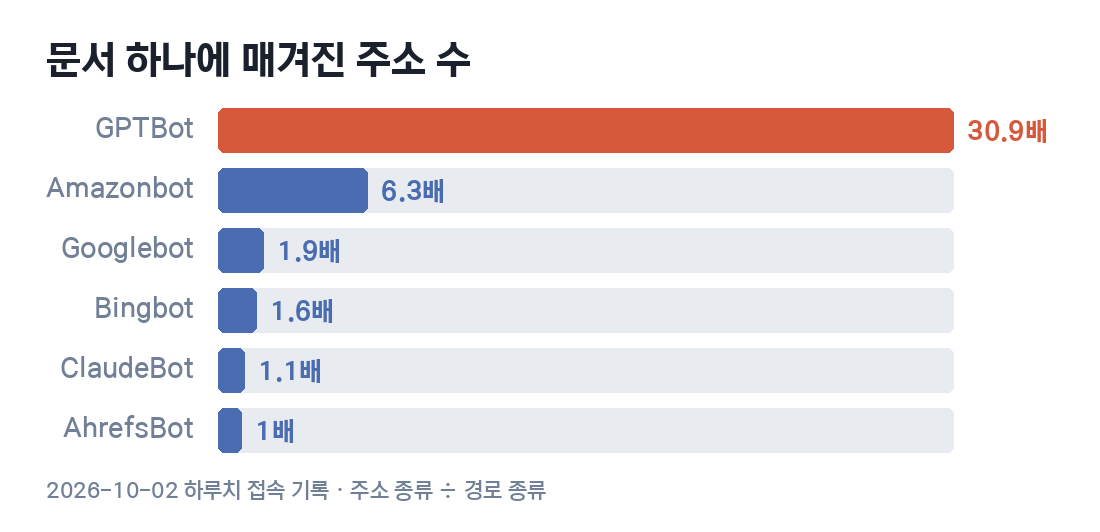
The top line was the real issue. We had 9,542 actual documents, but the crawlers reported 295,042 URLs. It seems they were assigning an average of thirty-one URLs to a single document and then collecting them all separately. In terms of requests, this accounted for 11.3% of the total 2.61 million requests for the entire day, and in terms of data transferred, it amounted to 3.43 gigabytes. Even though a single response was only about 12 kilobytes, the sheer volume of nearly 300,000 requests added up.
It wasn't just one bot scraping everything at once. The requests came from 231 different addresses. It looks like blocking a single specific address won't be enough to deal with this. When you add up the six bots that identified themselves, they accounted for 19.8% of the daily requests, and the vast majority of that traffic came from that very top line we discussed.
On the same day, ClaudeBot, which visited the same site, saw 4,624 URLs for 4,055 documents. That's a ratio of 1.1. AhrefBot, on the other hand, was exactly 1.0. We were all looking at the same links, yet one side reported 1 and the other reported 31. If the content sent by the site was identical, the difference must come down to how the receiving end interprets the URLs.
Sorting Links Are Creating Unique URLs
The culprit was the sorting links on the list pages. Most bulletin boards have sorting options like "Newest First" and "Most Viewed." When I dug into the URLs these buttons generated, I found that they weren't just carrying the sorting criteria. They were bundling in the current page number, the board name, and any active search filters.
If you click the sort button on the third page, it generates a URL that essentially says, "Show me the most viewed items on page three." If you have a hundred pages, you end up with a hundred different sorting URLs. Then, those new pages have their own sorting buttons, and those buttons carry the current state along with them. If you follow those links, you'll keep getting new URLs forever.
Looking at the percentage of requests that included sorting parameters clearly shows the difference between the bots.
| Crawling Bot | Requests with Sorting Parameters |
|---|---|
| GPTBot | 97.7% |
| Amazonbot | 79.2% |
| Googlebot | 54.1% |
| Bingbot | 17.6% |
| ClaudeBot | 2.0% |
| AhrefBot | 0.0% |
For GPTBot, over nine out of every ten requests included sorting parameters. On the flip side, AhrefBot didn't generate a single one. It simply didn't follow the sorting links.
Even Empty Filters Create Unique URLs
I took one of those URLs and broke it down further, and what I found was even more surprising. The slots for search terms and categories were present in the URL, even when they were completely blank. Since no search was actually performed, the content was the same, but the URL was different.
To the human eye, it looks like the same page. But to a system comparing URLs character by character, they are different documents. If you have six empty filter slots, every single combination of those empty slots can result in a unique URL. If you multiply the two sorting options by a hundred pages, and then multiply that by the number of empty filter combinations, you get the number thirty-one.
It’s hard to pin this solely on the bots. The premise that different URLs mean different documents isn't necessarily false. However, if you blindly trust and follow that premise to the end, you end up with a website that seems endless, and my site was one of those.
The Password Screen That Was Hit 54,377 Times
When I broke down the traffic by specific paths, the top culprit was totally unexpected. It wasn't a blog post; it was the screen asking for a password. That's 54,377 requests a day, totaling 275 megabytes. GPTBot accounted for 8% of the total data transfer we saw here.
This screen pops up when you try to edit a protected piece of content. If you don't know the password, nothing shows up. Since bots obviously don't know the password, all 54,377 requests were just hitting the same input box. Even on this screen, there were parameters for sorting and page numbers. This meant that every single post, every page, and every sorting method generated a unique URL.
What's important to note is that this traffic came from a place where there was nothing to gain. The bot doesn't know whether that screen requires a password or not. As long as the response code was normal and content was returned, the bot considered it a successful hit. I've written before that the experience of linking versus receiving is different, and this exact same thing happens between bots and the server.
Blocking Images Had an Effect, But...
The initial image blocking I implemented actually worked. All the image requests from the three bots I listed in my settings were being rejected. The amount they downloaded dropped to around 1 megabyte per bot.
However, the total traffic was still 22.7 gigabytes, which was higher than our usual baseline before the issue started. It looks like the traffic that was going to images just got rerouted somewhere else. Even the bot that used to pull the most images changed, and an unlisted search bot took the top spot at 1.3 gigabytes. I left that one open because we thought it was necessary for search engine visibility.
There was another place the traffic moved to. The second most active bot had 39,570 requests that were hitting a redirect, and 983 requests were looking for documents that no longer existed—basically hitting old URLs. It seems the bot is still hammering the remnants of our old site structure, so this isn't a blocking issue; it's a URL cleanup problem.
Some other scraping bots that weren't on our block list were also trying to access the image folder. Although I only noted 3 megabytes for them, this shows the limitation of a simple list-based block. Blocking by name only works for the names you list. If a new bot pops up, you have to add it manually.
Stop Reacting, Start Preventing: Why Prevention Beats Blocking
After looking into this for five days, the conclusion was clear: we need to change our approach. Reject requests only works after they've already come in. The fundamental question—why are there so many requests in the first place (around 290,000)?—remains unanswered.
| Method | Effect | Limitation |
|---|---|---|
| Reject by Name | Reduces traffic immediately | Only works for the names you list |
| Specify in Opt-Out Documents | Decreases the number of requests | Only works for those who follow the rules |
| Designate a Representative Address | Aggregates duplicates to one address | Some bots ignore this |
| Mark Opt-Out on Sorting Links | Prevents combinations from forming | Requires modifying the links themselves |
| Remove Empty Conditions from Addresses | Reduces the total number of addresses | Requires fixing the list code |
The first two items are external measures we take from the outside. The last three are internal changes that stop the site from generating unnecessary addresses. When we look at the results, the bottom three are definitely more effective because we aren't relying on the bots to follow any specific rules.
In terms of workflow, removing empty conditions is the cheapest option. If you ensure that no conditions without values are attached when creating sorting links, you eliminate entire combinations right there. I saw something similar when I analyzed where human intervention stops automation, and it was clear: preventing the work from happening in the first place required less effort than building defenses to block it later.
Don't Take These Numbers at Face Value
These figures are based on just one day's worth of data. Since bots operate differently every day, the ratios could change the next day. If you want to claim that the same bots maintain the same volume over multiple days, you'll need to look at a longer period.
We categorized the bots based on the names in their request headers. Keep in mind that the sender can write whatever they want in that field. Any scrapers that pretend to be a browser without disclosing a name aren't included in this tally. So, the numbers in the table only reflect bots that provided a name.
Also, just because the number of addresses for the community center (Gyeongnodang) is close to one doesn't necessarily mean it's a good bot. It just means it didn't follow the sorting links, and it might have missed pages that needed to be scraped during that process. A server being light on load is different from it having properly read the site. What we counted this time is only the front end.