
Why AI Content Clumps in WordPress Posts
When I take an AI-generated draft and paste it into WordPress, I often drop in the complete HTML. Everything—titles, tables, code—looks perfect on the screen. Because of this, I never thought it was an issue. So, I pulled the body content from 79 posts across two blogs and counted how WordPress actually interprets that content.
Out of those 79 posts, 69 had their entire body treated as a single block. A piece averaging about 4,830 characters was just one unsegmentable chunk in the editor. And here's the kicker: none of those 69 posts had any visual display errors. What I found today is how these two things can happen at the same time.
How WordPress Divides Content Blocks
WordPress doesn't segment content based on HTML tags; it uses comments. When you write a paragraph in the editor, it gets saved in the body like this:
The <p> in the middle is what the browser renders, but those two lines of comments outside are WordPress's way of marking, "This entire section is one paragraph block." The browser simply ignores those comments, which is why the screen looks fine even without them.
If WordPress reads content without these block comments, it has no basis for division, so it treats the entire thing as one nameless block. In the editor, this appears as a single "Classic" block. I counted which side the 79 posts fell on.
| Category | Count | Percentage |
|---|---|---|
| Total Published Posts | 79 | 100% |
| Posts with at least one block comment | 10 | 12.7% |
| Posts with zero block comments | 69 | 87.3% |
It becomes even clearer when you look at the character count. Combining the content from both blogs totals 380,677 characters, and 333,251 of those—a whopping 87.5%—are outside of block comments. If you look only at the blog dealing with AI drafts, 44 posts totaling 203,610 characters are all outside of comments, meaning 100% of them have none.
When Did This Start Happening?
If you look at the publication month, the timeline becomes pretty clear.
| Publication Month | Number of Posts | Avg. Block Comments Per Post | Percentage of Text Outside Blocks |
|---|---|---|---|
| June 2026 | 3 | 70.3 | 0.0% |
| July 2026 | 37 | 15.2 | 81.6% |
| August 2026 | 26 | 0.0 | 100.0% |
| September 2026 | 13 | 0.0 | 100.0% |
The three posts from June had an average of 70 block comments per post, with 0 characters left outside the blocks. These posts were built by stacking blocks one by one in the editor. Starting in July, the ratio flipped, and after August, there were none left. This lines up with the time we switched to pasting fully formed HTML directly into the content instead of going through the editor.
We made that switch for a clear reason. For posts with five tables or two or three code blocks, pasting the complete HTML is way faster than assembling it using blocks in the editor. The trade-off is that block comments won't appear unless a person manually adds them.
How Many Tags Are Outside the Blocks by Category?
I counted every single tag in the main content and separated them into those that fell inside a block comment section and those that were outside.
| Element Type | Total Count | Inside Block | Outside Block | Outside Ratio |
|---|---|---|---|---|
| Paragraph (p) | 2,237 | 433 | 1,804 | 80.6% |
| H2 Heading | 539 | 89 | 450 | 83.5% |
| H3 Heading | 155 | 44 | 111 | 71.6% |
| Figure (Tables/Images) | 170 | 18 | 152 | 89.4% |
| Table | 151 | 18 | 133 | 88.1% |
| Preformatted Code (pre) | 114 | 46 | 68 | 59.6% |
| Unordered List (ul) | 89 | 37 | 52 | 58.4% |
| Ordered List (ol) | 25 | 2 | 23 | 92.0% |
| Image (img) | 19 | 0 | 19 | 100.0% |
| Blockquote | 10 | 0 | 10 | 100.0% |
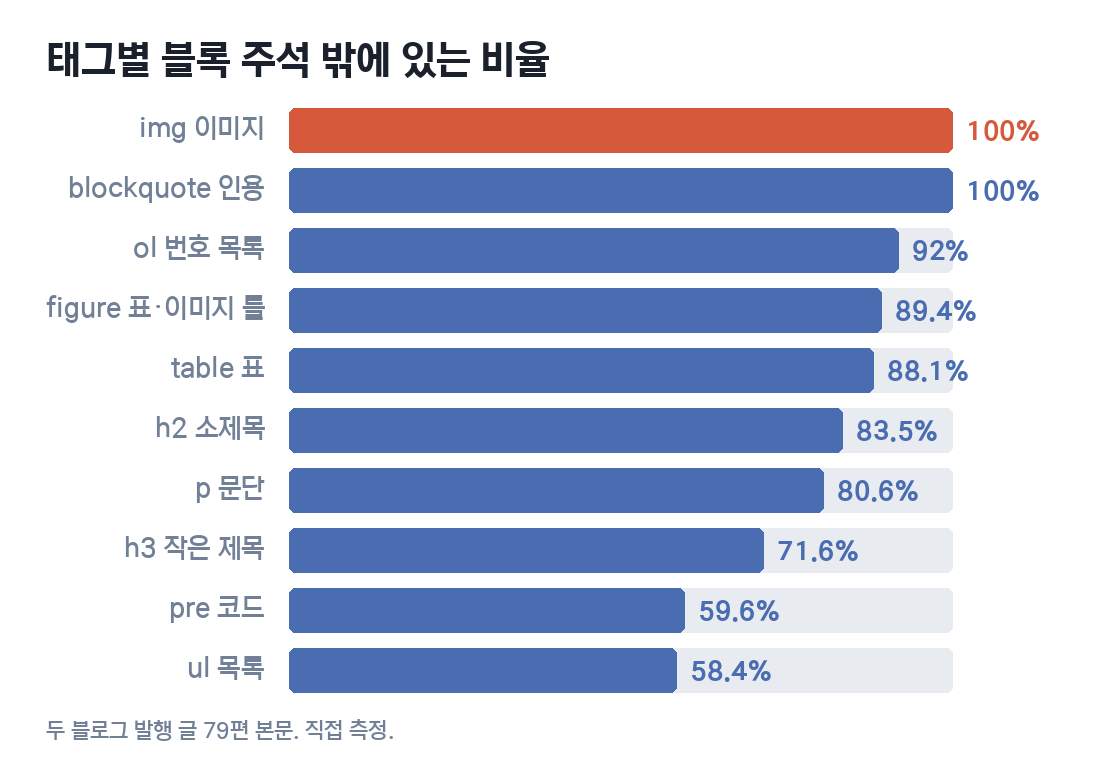
Not a single tag was exempt. But one thing really stood out: most of the content inside the blocks was written using the editor in early June and July. Images and blockquotes had absolutely no blocks associated with them.
The Class Names Are Also Missing
When WordPress creates a block, it adds a class starting with wp-block-. If you write HTML yourself, you only get the classes you manually add. So, I counted how many tags had these classes and how many didn't.
| Tag | Total | With Class | Without Class |
|---|---|---|---|
| figure | 170 | 170 (wp-block-table 151, wp-block-image 19) | 0 |
| h2 | 539 | 83 (wp-block-heading) | 456 |
| ul | 89 | 37 (wp-block-list) | 52 |
| pre | 114 | 36 (wp-block-code) | 78 |
| table | 151 | 7 (has-fixed-layout) | 144 |
The only element that is 100% is the figure. This is because when I input tables and images, I use the format <figure class="wp-block-table">. Everything else is just a plain tag. Out of 539 subheadings, 456 of them don't have a class.
Lists Show the Biggest Difference
The biggest discrepancy I found was in the lists. I counted the posts that contain lists versus the posts that contain list blocks.
| Category | WordPress Side | AI Side |
|---|---|---|
| Posts Containing Lists | 31 | 31 |
| Total ul and ol | 73 | 41 |
| Those Identified as List Blocks | 39 | 0 |
Both sides have 31 posts with lists, but on one side, over half are blocks, while on the other, none are. The 41 lists on the AI side are all just plain tags.
When I looked closely at the 39 items identified as blocks, there were 143 total items, averaging 3.7 items per list. Each individual item averaged about 17.3 characters, and nearly half of them had three or four items. Furthermore, all 39 of these blocks were immediately preceded by a paragraph. This shows that the structure of explaining something in a paragraph and then listing it out is still present.
We can also see a difference when comparing this to tables. There are 151 tables in 79 posts, compared to 114 lists, meaning tables are about 1.3 times more common. Tables appear in all 79 of those posts, whereas lists appear in only 62. This suggests a tendency to use tables when there's something to enumerate, rather than lists. While this is a different issue than block annotations, it's something we wouldn't have seen if the main content hadn't been extracted as data.
So, Why Does Everything Still Look Fine?
This is the most crucial part of what I measured today. If the classes are missing, the styles targeting those classes won't apply. In theory, this should cause tables to break or code blocks to look messed up. But that's not what happened. I found two reasons for this.
First, WordPress only attaches block-specific style files to the posts where those blocks are actually used. If a post lacks block comments, there's no reason for a style file to be attached. I checked 26 posts across two different blogs to see exactly which style files were loaded.
| Category | Total Pages | Pages with Tables | Pages with Applied Table Styles |
|---|---|---|---|
| WordPress Blog | 15 | 15 | 14 |
| AI Blog | 11 | 11 | 0 |
For the 11 pages on the AI blog, not a single block style file was loaded. This applies even though they contain tables and code blocks.
Second, the reason the tables still look correct is because the theme is already handling those styles itself. I looked through the theme's stylesheet and found the rules governing the tables.
global.min.css  : table { margin:0 0 1.5em; width:100% }
content.min.css : .wp-block-table table { border-collapse:collapse }
WordPress's block styles apply things like border-collapse:collapse and width:100%, but the theme already has rules set up for those elements just by targeting the tag name. So, even without the block styles, the result is the same. It's the same story with subheadings. The only rule targeting wp-block-heading is adding padding to headings that have a background color, and I never used a background color on my headings.
To wrap it up, the fact that 87.5% of the content is outside of block comments and doesn't show up visually isn't because the design is inherently safe—it's because the theme I'm using happens to be covering those gaps. If you switch themes, there's no guarantee how your content will look.
What You're Actually Paying For
If it's not showing up on the screen, then what you're losing is what matters. I re-counted how WordPress is splitting up the 69 pieces of content.
| Item | Value |
|---|---|
| Posts that are one single block | 69 (All of them) |
| Percentage of that block in the post body | Average 100.0% |
| Character count of one block | Average 4,830 characters (Median 4,686) |
| Longest block | 8,054 characters |
| Shortest block | 3,584 characters |
All 69 posts are one single block, without exception. If you open any of these posts in the editor, even if you just want to fix one table, you have to hunt for that table inside an HTML structure that's about 4,800 characters long. You can't even use features like moving paragraphs up or down, or undo actions on a block level.
Should I Change This?
I decided not to change it. Here’s why.
- I don't have any instances where I need to edit the body content in the editor after publishing. If I need to make a change, I just edit the original HTML and re-upload it.
- If I wanted to add block comments, the publishing script would have to insert matching comments for every tag, and if even one is off, the editor throws an error saying, "There is an unexpected error in this block." That risks creating problems that don't exist now.
- The difference in how it appears on the screen hasn't shown up in the scope I checked today.
Instead, I'm writing down the conditions. If I ever change my theme, add features that read the block structure like a Table of Contents, or if I start editing things directly in the editor, then 87.5% of this cost will come back to me. I'm keeping these numbers here so I can reassess later.
The Bottom Line
The HTML generated by AI is technically perfect from a browser's perspective. The tags are closed, tables are structured correctly, and the heading levels are right. What's missing are the parts the browser ignores—the comments WordPress uses to define its own structure. Since these comments don't show up anywhere visible, they haven't caused any issues during the 79 posts I've published.
These kinds of discrepancies are impossible to spot just by looking at the screen. Just like when I counted the table layouts in that post or checked the number formatting in that other post, you have to extract the content as data to find them. Out of all the numbers I mentioned today, the most reliable one isn't the 87.5%; it's the fact that this 87.5% hasn't caused any symptoms across 79 posts. Having no symptoms doesn't mean there's no problem; it just means something else is currently covering that issue.