
Why AI Code Blocks Get Longer on Phones
Out of 83 articles started with AI drafts, there were 124 code blocks. These blocks mixed commands, configuration files, PHP filters, and log outputs. Even though I revised the sentences multiple times while polishing the writing, I mostly left the code blocks exactly as the AI provided them. So, I went through all 124 blocks to measure things like word count, type, surrounding context, and how many lines they actually take up on a phone. Here’s the takeaway in three points: Zero blocks had language labels, only 8 blocks contained comments, and when calculated for phone screens, the line count increased by 1.76 times the original, meaning over half the blocks were more than double in length. This doesn't mean the code itself is wrong. It just means that while the code generated by AI is generally correct as "code," it requires very little effort to handle as "code within the text."
100 Out of 124 Blocks Appear on a Single Site
My sample included 37 WordPress blogs and 46 AI-generated blogs, totaling 403,304 characters. The code blocks (<pre>) showed a four-fold difference, with 100 on the WordPress side versus 24 on the AI side. This difference is expected since the topics are different, but within those 24 AI blocks, 13 were clustered in just one article (related to the Codex sub-agent settings). In reality, 38 out of the 46 AI articles contained no code blocks at all.
| Category | Articles | Code Blocks | Per Article | Inline Code | Per Article |
|---|---|---|---|---|---|
| WordPress Blogs | 37 | 100 | 2.70 | 521 | 14.1 |
| AI Blogs | 46 | 24 | 0.52 | 191 | 4.2 |
| Total | 83 | 124 | 1.49 | 712 | 8.6 |
The distribution per article showed that 48 articles (57.8%) had zero code blocks, 9 articles had one, 12 articles had 2 to 3, and 14 articles had four or more—with a maximum of 13. The inline code (<code> inside sentences) totaled 712 instances, far surpassing the code blocks, and 27 articles had none. The articles with code and those without are split evenly, but the code tends to pile up in the articles that do have it.
Code Block Breakdown: Average Length is 4.3 Lines and 128 Characters
| Line Count | Blocks | Percentage |
|---|---|---|
| 1 line | 38 | 30.6% |
| 2–5 lines | 63 | 50.8% |
| 6–15 lines | 17 | 13.7% |
| 16+ lines | 6 | 4.8% |
The median line count is 3 lines, and the median character count is 90 characters. The longest block is 33 lines and 751 characters (a single translation function), which only accounts for 3.9% of the entire body when all 124 blocks are combined. Out of the total, eight blocks are short snippets that fit within five lines, and 38 of those are single-line blocks. These one-liners are usually just a single command, like wp core verify-checksums, or a file path.
What's Inside: Categorizing the Content
I sorted the block content based on its first line and pattern. Anything that felt too ambiguous to categorize was grouped under 'Other.'
| Category | Blocks | Percentage | Example |
|---|---|---|---|
| PHP | 24 | 19.4% | add_filter( 'show_admin_bar', '__return_false' ); |
| Shell Commands | 23 | 18.5% | find wp-content/uploads -name "*.php" | wc -l |
| Configuration Files | 15 | 12.1% | pm = dynamic, SetOutputFilter DEFLATE |
| CSS, JSON, SQL, JS | 11 | 8.9% | SELECT option_name, LENGTH(option_value) |
| Logs/Output | 2 | 1.6% | [31-Oct-2025 08:59:17] PHP Fatal error |
| Other (Paths, Diagrams, Pseudocode, etc.) | 49 | 39.5% | /wp-content/debug.log |
The biggest takeaway is that 'Other' makes up a whopping 39.5%. When you dig into those, you find a lot that isn't actual code. There are single lines of file paths, a few lines of HTTP response headers, flowcharts drawn with arrows like "Page Request $\rightarrow$ Check Cache $\rightarrow$ Response," and even math formulas like Max = (Total Memory - Resident Usage - Buffer) / Average Worker tucked inside code blocks. It seems AI drafts have a habit of putting everything they want to display in a monospace block, and the people reviewing them haven't been cleaning up that habit.
Zero Language Tags and Eight Comments in the Code Blocks
Looking at the tags for the 124 code blocks, 78 of them use only <pre>, and 46 use <pre class="wp-block-code">. Not a single one has a class like language-php to specify the language. Since I'm not using a syntax highlighting plugin, it doesn't look different on the screen, but this means all the useful info—for readers copying the code, search engines, or for when you might add highlighting later—is completely missing. When you create a block in the editor, you can pick a language, but because I published the entire finished HTML as-is, that step was skipped. I covered this publishing method's residue in post 69, which discussed when the entire body was just one block.
Eight blocks (6.5%) contain comments (using #, //, or /* */). Out of 24 PHP blocks, only two have comments, and all 23 shell commands are just commands with no comments. Instead, the preceding paragraph handles the explanation. Out of the 124 blocks, 122 are placed right after a paragraph, and 114 of those paragraphs end with a period. I never used the common English document style of ending a sentence with a colon (:) to lead into code. Furthermore, 113 blocks are followed by another paragraph, and only 10 transition directly into a subheader. Almost always, the code is followed by a sentence like, "This code does X."
39 Korean Characters Inside the Code
Korean characters appear in 39 blocks (31.5%). Here is the breakdown:
| Role of Korean | Count | Examples |
|---|---|---|
| String or Placeholder | 21 | '/home/username/logs/wp-debug.log', https://mydomain/ |
| Output Result or Table Stand-in | 14 | default : 943 times, may not be |
| Comment | 4 | /* Adjust WordPress body font size and line height */ |
The 21 placeholders are the real problem. If you copy and paste username, mydomain, or site name as they are, it won't work. While 23 blocks used the English convention like example.com or your-domain, the Korean placeholders stand out because they don't look like code. This tells you that they need to be changed. The real issue is consistency. In one place, the same concept was written as example.com, but in another, it was written as mydomain.
Code Block Lines Double on Mobile Devices
This theme renders code blocks using the CSS property white-space: pre-wrap. Instead of forcing horizontal scrolling, the lines wrap within the screen width. When code wraps, it can change how the meaning appears. If one command spans two lines, a reader might interpret it as two separate commands. Because of this, we calculated how many lines the code actually appears to have.
Here are the assumptions we used for the calculation: We fixed the font size at 15px (with a character width of 0.6em, or 9px). For the PC, the content area is 733px after accounting for side margins and padding within the block, allowing for 81 characters per line. For mobile, using a 360px screen width and the same margins, the content area is 219px, meaning only 24 characters fit on a single line. Please note this is an estimate based on CSS values, not actual measurements, and the exact count might vary by two or three characters depending on the phone model and font used.
| Category | Original Lines | PC Display Lines | Mobile Display Lines |
|---|---|---|---|
| WordPress Blogs (100 sites) | 428 | 435 | 733 |
| AI Blogs (24 sites) | 101 | 106 | 198 |
| Total (124 sites) | 529 | 541 (1.02x) | 931 (1.76x) |
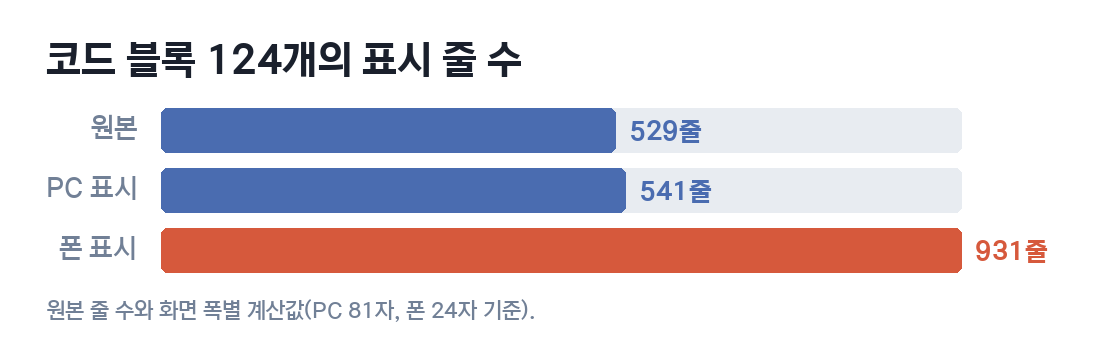
- Out of 529 lines in the original text, 272 lines (51.4%) are longer than 24 characters. Since only 12 lines exceed 81 characters, they rarely wrap on a desktop screen.
- There are 101 blocks (81.5%) that contain at least one line longer than 24 characters.
- In 54.0% of cases, blocks expand to more than double their line count on a phone. Among the 38 single-line blocks, 30 of them take up two or more lines on a mobile device.
- The blocks that expand the most see a jump from 15 lines to 33 lines.
The median length of the longest line is 46 characters. This is a length that fits comfortably on a desktop but wraps to exactly two lines on a phone. AI tends to cram all options onto a single line in command-line instructions, which is how this length naturally occurs (e.g., There are 712 instances of The most frequently cited items are We aren't going to go back and fix the 124 instances we already have. While we *could* automate adding language classes, since 39.5% of the content falls under "Other," auto-labeling would lead to incorrect tags. Instead, we've set these guidelines for all future posts. To measure this, we used PHP to extract all Where Did the 712 Inline Code Snippets Go?
Content Type
Count
Percentage
Single Word (Option name, hook name, etc.)
322
45.2%
File or Path
138
19.4%
Phrase with Spaces
83
11.7%
Snake Case Identifier
70
9.8%
Including Korean Characters
31
4.4%
HTML Tag, Constant, Flag, Function, Number
68
9.6%
What We've Decided Moving Forward
<code> at a 24-character limit. Humans, not AI, will decide where those line breaks occur.example.com and will no longer use Korean placeholders.<pre> and <code> tags from the body of 83 published articles across both sites using regular expressions. We calculated the visible line count based on the theme's CSS settings, including width, padding, and font size.